Showing posts with label Security. Show all posts

18 January 2016

Silicon Cognition

2016: Silicon Cognition


Several years ago I flogged the term “Cloud-Based Episodic Parallel Processing” and tossed c-bepp.org onto the Internet with a concise manifesto of a vision: a cloud API for applications running on PCs and other puny computers to be called when massive computation (or computation on massive amounts of data) is required.

My focus was applications like personal medicine, where a patient’s symptoms and genomic information (for example, the DNA sequence of their tumor) could be correlated against a vast database of similar sufferers, and the best course of therapy for the particular patient selected based on outcomes amassed over time and the spectrum of therapies that had been tried.

I likened the process to a hybrid car, which carries a modest gas engine of barely sufficient power for light-demand usage but also an electric drive to add bursts of power in high-demand situations.

C-BEPP received limited interest at the time— some interesting conversations, some expressions of interest, a few amens— but ultimately it didn’t gel.  Wasn’t actionable.  The necessary software constructs seemed unapproachable.

But tonight it struck me: in the end, it actually did gel in a sense— with a twist.  Driving home, my watch guided me along the roadways, gently tapping me when turns were necessary: tap, tap, tap for right; tap-tap, tap-tap, tap-tap for left.  It did this by harnessing a sort of episodic cloud-based processing: Here was the puniest of personal computers, drawing intelligence from a distant cauldron of immense compute power.

The twist is that there is an intermediary I had not foreseen: the smartphone.  Powerful computers in their own right by any classical measure, these always-connected, sensor-festooned, multi-networked wonders provide valuable preprocessing and situational information to the distant brain based in the cloud.  My phone interacted with me via the watch, and it corresponded with the cloud-brain, serving as interlocutor and conductor of the orchestra of data to and from my wrist.

In return, the cloud-brain gained insight from observing me: knots of traffic I encountered, my speed, diversions and alternate routes I chose to take, and so on.  Perhaps even biometric information from my watch caught its interest, since that was available too.  Who knows, if I wrenched the wheel sharply, it might even have noted an obstacle in the road.

My eyes were its.

Silicon ganglions

Throughout history, successful innovations have often paralleled biological systems.  Airplanes possess similarities to birds; submarines to fish.  Advanced coatings draw heavily from nanostructures on plant-leaves, unwettable by even the heaviest rain.  Camera imaging chips draw from the design of the retina, and on and on.  It's called biomimetics.

So here we see an emerging compute paradigm similar to the biological structure known as a ganglion: a mini-brain, a peripheral intelligence interposed between transducers in the field and central processors in the cloud.

My phone's role in my evening commute struck me.  In 2016, it is the ganglion in a diffused intelligence in which I am a participant, beneficiary, transducer… and sensor.

Silicon Intelligence

Looking back at 2015, perhaps the most remarkable thing I read was a Google Research blog post entitled “Inceptionism: Going Deeper into Neural Networks” (http://googleresearch.blogspot.co.uk/2015/06/inceptionism-going-deeper-into-neural.html).

This described recent work in correlative recognition using the specialized compute structure called a neural network.  These systems learn by observing large data sets.  Their predictive capability self-adjusts over time via observation and feedback (http://www.dspguide.com/ch26/4.htm).

And, when idle, they dream.  That Google Research blog post presented otherworldly phantasms imagined by the neural networks when ruminating over image databases.

Haunting stuff, not least because the phantasms seem so brilliantly dream-like.  The stuff of a dawning intelligence.  The stuff of nightmares.

What recognitions, then, might such an intelligence draw if fed something close to the sum of human thought and behavior?  In 2016, I think we will begin to find out, because portals to that exist today.  They are specialized in various ways: consider the databases of a Google, an Amazon, an NSA.  Immense insights await the hungry brain capable of observing it all.

Silicon Consciousness 

There’s more.  The difference between intelligence and consciousness is simply being-in-the-now.  Observing and correlating databased truth is one thing, and it allows inferences and recognitions to be drawn.  But observing and correlating the world as it happens is quite another thing, and this is the natural agenda of Internet of Things as it unfolds, whether its participants are aware of it or not.  This is the stuff of consciousness, not just intelligence.

And, in 2016, it is here.

Silicon Precognition

Philip K. Dick’s 1956 short story, “The Minority Report” (later turned into an engaging movie), centered on mutants capable of foreseeing crime.  In 2016 we need no mutants: we have the germ of silicon consciousness animated by silicon intelligence, leavened by a critical mass of human thought and behavior, and illuminated by a real-time sensorial feed from exponentiating millions of sensor-equipped minions like me, just going about our days.  Given such a vast and dense sense of history and now present, the leap to foreseeing the future is a minor one.

And an inevitable one.

Consider again who those big-data players are.

Consider again the real value of big data in 2016.

Biomimetics, writ large

Throughout history, successful innovations have often paralleled biological systems.  And so the beehive enjoys a collective consciousness, animated and leavened and illuminated by its throngs of worker bees as they go about their day.  Occasionally one will find a promising flower-patch and will convey news of the bounty back to the hive by pheromone and even through coded dance.

And so I arrived home, finding my family freshly returned from a wine-tasting expedition in the hills behind us.  My day’s meetings had gone well; the Pinot Noir they brought home is truly excellent.  The brain in the cloud observes my copacetic pulse-rate, the relaxed sway of my motions, the contemplative tap-tap of my keyboard.

What is my coded dance?


This essay was originally posted on Patricia Seybold's customers.com site.

07 November 2014

Was Sheryl Attkisson's computer hacked? The video is hardly compelling evidence

The Politico has published an exclusive cell-phone video provided by former CBS News reporter Sheryl Attkisson and supporting her claims that her computer was hacked, presumably in relation to her inconvenient reporting on Benghazi and other Administration scandals.  The video shows a Word document on her Macbook Air being modified by some mysterious operator.

Now, this would be easily enough explained if Attkisson had enabled some standard OS X features and a malevolent operator had leveraged them, or if an attacker had somehow installed and enabled remotely-accessible hacking tools.  But, as I'll document, there are problems with either explanation, and with dismissive explanations from some observers that Attkisson was simply experiencing "garden variety technical glitches."  In particular there is one detail in the video that seriously needs explanation from Attkisson or whoever set up her Mac.

First, Macs (and PCs) have remote desktop sharing capability. It's normally disabled but is easily enough enabled by a user with administrative privileges on the machine. I use it all the time to access an old Mac that I use for archival purposes.

But, I know that machine's IP address. I can't just access anyone's Mac that way: it must be enabled, I must know the machine's IP address (and unless it's connected directly to a DSL or cable modem, there's no easy way to get to it from outside the LAN that the machine is on, unless a dynamic DNS utility is running on the machine, which on the evidence I'd doubt Attkisson would know how to arrange on her own).

But there's a problem.  Sitting at the target machine, the phantom operations from a remote desktop-sharing operator look a lot like what Attkisson shows in her video. But, if one is using ordinary Mac screen sharing as built-into OS X, there is an icon in the menu bar that lets you know that control of the machine is being remotely shared. An example is shown below, highlighted in blue: ​


 In what little of that corner of the screen Attkisson shows, there's no such icon: ​


Instead, from left: Dropbox (fully sync'd), AppleScript, Time Machine (OS X's built-in backup utility ...and it seems Sheryl hasn't backed up lately), Bluetooth (on), WiFi (connected), speaker volume, battery (charging), date/time (apparently it's Monday).

There may be other items to the right of the edge of the screen capture, but this moment, at about 0:50, was the broadest view I was able to capture from her video.

...Wait: AppleScript?

AppleScript is a built-in OS X capability that allows easy recording and playback of keyboard, menu and screen operations.  What is its icon doing in the menu bar during this video?

Based on the video, either:
  • The attacker is using OS X Screen Sharing but its telltale icon resides just off the edge of the video.  The issue of getting to the computer through whatever WiFi network it's logged into is still tough to explain. 
  • Or, the built-in screen sharing capability is not what's being utilized by the remote attacker, meaning Attkisson's computer was really and truly hacked.
  • Or, something other than a remote session is actuating the mouse and keyboard off-screen, such as a USB or Bluetooth external keyboard... or an AppleScript macro. 
Bottom line: It's a shame that Attkisson isn't more computer literate (and better videographer!), as this video raises more questions than it answers, and dastardly action by some government agent is not necessarily the likeliest explanation, much as one might want to think so.

06 September 2014

How to easily share Keynote presentations and other iWork documents with colleagues

I do a ton of presenting and have found Keynote on my iPad to be a tremendous upgrade over PowerPoint.

  • There's no waiting for boot-up, 
  • Transitions are beautifully fluid, 
  • Animations and videos are 100% reliable and always smooth (and never a black box on the screen where a video is supposed to be!), 
  • Projector compatibility is untouchable, and
  • Courtesy Geekwire's excellent article, "Undeterred
    by Office for iPad, Apple updates iWork suite"
  • Integrated presentation tools such as virtual "crayons" and "laser pointers" mean you never have to face away from your audience.  

In a competitive environment, Keynote is a valuable arrow to have in your quiver.  Plus, the software runs identically on my iPhone, meaning I can always have your presentations in my pocket.  Being able to whip out a compelling, good-looking presentation at a moment's notice conveys a valuable message of preparedness and professionalism.  That is not of merely academic merit-- it has meant actual, substantial sales for me.

Keynote presentations also transport reliably.  There are none of the missing-font and misplaced-video issues that have afflicted PowerPoint for two decades.  With Keynote, all media and other resources are bundled together in an amalgamated file format.

However, the locked-down nature of iOS presents obstacles to sharing Keynote presentations with colleagues.  You can store a presentation in iCloud and share a link to that, but if the presentation is large, chances are excellent that the download into the recipient's device will break at some point.  Perhaps that will improve over time.

iOS also pioneered a concept of hiding the device's file system, having applications own and manage their own files instead.  There is nothing like a Windows Explorer or Finder in iOS.  You open Keynote; your Keynote files are right there.

A mysterious option

First, let's agree that using iTunes to convey files from device A to device B is not acceptable in this day and age.  Next, let's stipulate that iCloud's current file-conveyance capabilities aren't yet industrial-class, especially with larger Keynote presentations.

But there's a third mechanism: the mysterious WebDAV option you may have noticed in Keynote and other iOS apps, both on iPad and iPhone.

Web Distributed Authoring and Versioning is a standards-based approach for making the web a readable and writeable medium.  It provides a web-centric, firewall-friendly way of accessing and storing files across the Internet.  Sounds good... but, it's not clear what even the first step should be for leveraging this technology on iOS.

First, fond as I am of Dropbox, it does not support WebDAV, and per their FAQs they have no plans to do so.  So it's not a solution here.  There are third-party services such as DropDAV that you can subscribe-to that provide WebDAV compatibility for Dropbox, but for my occasional usage the annual cost seemed unreasonable, and some users would be justifiably uncomfortable with allowing a third-party service to have access to their Dropbox'd files.

A few competing cloud storage providers provide rudimentary WebDAV compatibility, but flaws abound.  Box.net, for example, lets you upload and download using WebDAV-- but with a catch: At least for the pricing tiers I explored, you have to give your account username and password to anyone you want to be able to access any file.  That's such an obvious non-starter that it's almost mind-blowing.  Even more mind-blowing is how universal it seems to be; I spent hours exploring various services and this sort of idiocy is depressingly common.  Shame on you, Internet.

An exceptional exception

Finally, an exception popped up.  There is a Swiss online storage company, MyDrive.ch, which offers a responsive, secure and well-priced service that supports WebDAV beautifully and has optional guest accounts.  So, you can distribute the guest-account credentials and limit their access to specific folders and permissions.  Perfect!

MyDrive even offers a free tier, with one guest account and 100MB of storage.  That might be enough for many purposes, but I needed more storage than that.  So I upgraded to their "MyDrive Pro" with over 3GB of storage for the princely sum of approximately $10 a year (and they gave me a bonus month on top of that).  Additional guest accounts are $0.50 a month.

They have a free iOS app too, but that doesn't get around the problem that only Keynote can access your presentations on your iDevice.  For that, we'll use WebDAV:

How to use MyDrive.ch's WebDAV feature to share your Keynote presentations

1) Set up your MyDrive.ch account in a browser on your computer or iPad.  You'll receive an authentication email immediately; look for this, and click the activation link it contains.  All set!

2) In the browser, log in and establish any folder structure you want.  I suggest creating a dedicated folder for uploads from your guest(s) if that's something you might want to enable.  MyDrive.ch enforces a rule that only the master account can write to the root folder; by default, guests can access files in the root folder for read-access only.

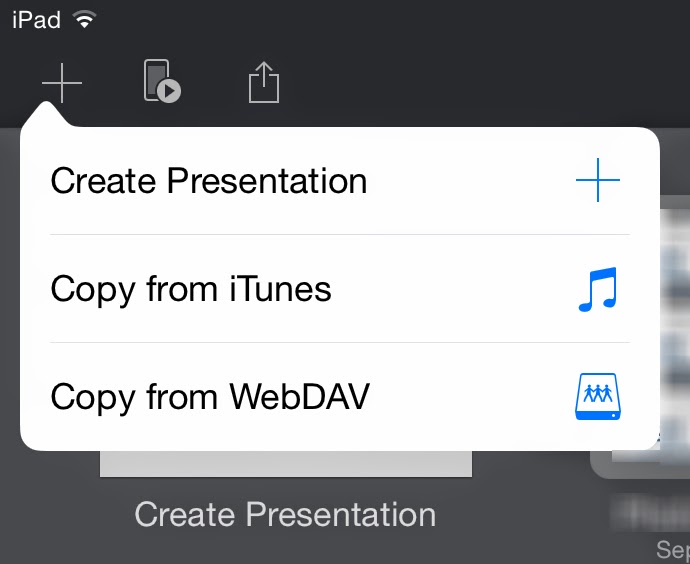
3) Switch to Keynote.  On iOS, in order to log into your WebDAV-supporting service to upload a presentation, you must first go through the initial steps of downloading something even if there's nothing there yet to download.  So to start: In Keynote's screen that presents your collection of presentations, click the "+" sign at the upper left, and select Copy from WebDAV.  A login screen will appear.

4) For the URL, type https://webdav.mydrive.ch/  ...you can add a folder-name to that if you wish.  (All this is case-sensitive.)  Type in the user name you just established, or the guest name in the form of GuestName@MainUserName. Then, fill in the password for the user you just entered. 

5) Click "Sign In."  Your file-list, if any, will appear.  Clicking on any presentation will download it to your iDevice's Keynote store.  (Keynote files will show up with a .zip extension-- ignore that.)

6) To upload a presentation to share with others, cancel out of the login screen and open the presentation you want to upload.  Click the Share button, then Send a Copy.) Select WebDAV.  From the upload formats you're offered, you'll probably want to choose Keynote.  Your iDevice will click and whirr for a moment, and then the file will be uploaded.  

Done!

Steps 4 & 5 are all your colleagues need to access your presentations: they'd just click the "+" button at the top left of their Keynote presentations listing, Copy from WebDAV, fill in the URL and guest username and password, et voila.

A few caveats

MyDrive supports SSL encryption, as you may have noticed from the https URLs in these examples.  However, if you want your browser-based connection encrypted, you must checkmark the "Use SSL encryption" option at the login screen, even if you logged in via https://mydrive.ch.  I would prefer an "always use SSL" option be instituted in the account settings ...and certainly if you log in via an SSL-encrypted page, your connection should stay SSL-encrypted.  From a usability standpoint, this is a minor but potentially important behavior to be aware-of. UPDATE: The responsive MyDrive folks have responded to this post by changing to an always-on SSL policy. Great!

If you wish to allow your colleagues to upload presentations without giving away your master account credentials:
  • Create a folder to receive their uploads:  Log into your MyDrive.ch account using a browser on your computer or iPad.  Add the folder via the "Create Folder" button.
  • Create a guest account for your colleagues to use and set its permissions to allow uploads:  In the Settings menu, select the Guests tab.  Create the guest account there, assigning full access to the guest.  (Currently, MyDrive's upload access setting doesn't actually enable uploading from within iWork applications via WebDAV.  I have brought this bug to MyDrive.ch's attention.UPDATE: Per MyDrive's engineers, this behavior is probably due to Keynote's usage of temporary scratch files.)  Don't worry, a guest account with "full access" can't delete files or folders at the root level.  If you wish to restrict access to specific folders for specific guest accounts, use a browser to go to your main file listing, and click the permissions button to the right of the folder.  


MyDrive.ch offers other goodies too.  For example, you can mount your MyDrive store as a network drive if your operating system supports such things (and all versions of OS X have done so: In Finder's Go menu, select Connect to Server and use the URL https://webdav.mydrive.ch ...authenticating with your username and password.)

Recommended.  My colleagues and I have already found this to be very useful for distributing some of my Greatest Hits presentations... and, likewise, getting their own to me, directly from their iPads.


22 February 2014

How to work around the latest Man-In-The-Middle attacks

The ImperialViolet blog has an informative analysis of the just-patched encryption issue that can potentially expose unpatched iOS devices to a man-in-the-middle eavesdropping situation in some circumstances.  Seems Mac users running OS X 10.9 Mavericks should anticipate an update in the next days too…

Do this now: Update your iOS device straightaway, and your Mac when an update comes.  It couldn't be easier: in iOS, go to Settings, click General, and then Software Update.  You'll need to be on WiFi.  The whole process takes 5-7 minutes and temporarily requires a shade over 1GB of free space on your device for scratch storage.

The vulnerability was in an open-source component of iOS (and OS X, and potentially other platforms).  My point is not to make snide assertions about open source— I agree that many eyes make for a more secure product, and the solidity of Linux attests to that.  But it's no panacea, as mistakes can still be made and persist, as this demonstrates ...as does the 14-month-old WebView Android vulnerability that made the news in the past few days.  In this newest case the flaw is very easy to see even if, like me, you’re no expert in C-like languages or encryption.  But somehow it got overlooked, including by the compilers that one would have hoped would have caught such a visible issue.

From what I’ve read, seems the code involved is a fork of the OpenSSL encryption module.  I’ve not yet seen an analysis of whether it may have propagated beyond iOS/OS X.  You can bet that many eyes are looking into that right now.

As I understand it: in this vulnerability, a man-in-the-middle attacker possessing an encryption certificate signed by a trusted Certificate Authority could potentially intercept an encryption handshake between a user and a secure service or website, and under some circumstances the mechanisms that would detect such an attack would be short-circuited, allowing the MITM to eavesdrop or maybe impersonate the remote party.

A Workaround

Patch or no patch, one way around vulnerabilities of this sort is to tunnel past the attacker using a virtual private network that authenticates by some unrelated mechanism.  Typically, once a VPN client is set up on your computer, tablet or phone, you can connect to it most any time, and it establishes an encrypted tunnel and routes some or all your traffic into that tunnel so nearby eavesdroppers can’t make sense of it.

Using a VPN routinely is not a bad idea for those, like me, who frequently rely on public hotspots in hotels, planes and other venues… including in untrustworthy countries.  A bonus is that a VPN also evades firewall blocks for things like Voice-over-Internet and (in some countries) social media.  Of course, one must have their eyes open about the local rules for utilizing such services… It’s one thing if your hotel blocks VoIP to maximize its in-room-phone revenues, but VoIP is flat illegal in many Middle East countries (for example).  Fortunately, if you’re on a VPN, no one between you and your VPN service can detect what you’re doing, at least not easily.

Also, when you’re connected via a VPN, it appears to the services you connect-to that you are connecting from the geographic location of your VPN’s endpoint.  That’s great for accessing your subscriptions to things like Netflix and Hulu when you’re traveling beyond copyright enforcement borders.

Commercial VPN services are plentiful, cheap and easy to use.  It’s also easy to set up your own: Here at Jordan Manor we have three: two (PPTP and ssh-forwarding) running on Linux on a little Raspberry Pi per the instructions at http://unvexed.blogspot.com/2012/08/how-to-set-up-real-encrypted-vpn.html and http://unvexed.blogspot.com/2012/08/how-to-use-raspberry-pi-as-secure-web.html and then a third kind (L2TP) running on an elderly Mac enjoying a second life running OS X Server.

Although some firewall situations block VPNs as well, having a choice of VPNs maximizes the chance one will get through.  And running your own VPN means blocking strategies based on the IP addresses of known commercial VPN services won’t work.  Corollary: if you successfully run your own VPN in a situation where commercial VPNs are routinely blocked, don’t blab about it, and resist the temptation to run “check my IP address” utilities on the web when using your VPN, as these can serve as honeypots that database the IP addresses of likely VPN services, which can result in their being blacklisted.

(Meanwhile, blocking strategies based on the port numbers commonly used by VPN services can sometimes be evaded by routing your VPN through non-standard ports ordinarily utilized for other services less likely to be blocked, though that’s often not possible since port assignments are often baked in the pudding of most operating systems and clients.  Of the three VPN implementations I run here, only the ssh-forwarding approach is amenable to that dodge.)

The takeaway

Just be careful out there, use duplicative layers of security when you can, pay attention to updates and patches for your OS and applications and especially for things that execute code on your machine, like Java and Flash.

Something to watch

One thing worth listening-for in the coming days is the potential impact of this bug on other platforms that might utilize the same open-source code …including the Tor network, as it is OpenSSL based.

31 December 2013

Cryptopocalypse: Can your iPhone be hacked by the NSA?

Today the Intertubes are awash with hysteric headlines like "The NSA Has Crazy Good Backdoor Access to iPhones".  It's quite the pile-on: besides the press' inclination to tear down the tall dog, there's something stunning about the well-regarded security of latter-day iDevices being easily circumvented by shadowy spies in Ft. Meade.

What's missing--as is all too typical--is a close and sober look at what's being disclosed.

Here's what we know from the latest Snowden documents:

The DROPOUTJEEP iPhone exploit requires physical access to the phone, which suggests it’s based on the sort of hard-boot privilege escalation that has animated the cat-and-mouse game of jailbreaking since 2007.  With each generation of hardware and software, old boot-time-access doors are closed by Apple and new ones discovered by jailbreak hackers.  The result has been continuous improvement of device security.

But hardware and iOS advancements now necessitate that all recent jailbreaks require the device filesystem be unencrypted by removing any passcode (and, in the case of the iPhone 5S, the fingerprint authentication).  That offers good likelihood that your recent iPhone or iPad is safe from this exploit if you enable the passcode.

But here’s something interesting that I’m not seeing discussed amid all the hoo-hah.  The source document that’s being splashed all over the Internet is dated 2007:


Specifically, the document datestamp is “20070108”.  It’s unclear if the date format is year-day-month, as is typically seen in the US outside of at least some government and military usage, or the more globally accepted year-month-day.  I’d argue the latter, because the iPhone was released on June 29, 2007.

Either way, the document relates to the very first generation of iPhone, before the filesystem encryption capability was even introduced.  (That came a year later, with iOS 2.)

So, calm down, people.  Enable your passcode.  And know that there are much more probable threats to your rights and privacy than this one.

14 December 2013

Five essential tools for maximizing your digital privacy

I don't quote my own blog posts very often, but a recent article in Slate, "Facebook wants to know why you didn’t publish that status update you started writing," spotlights an issue that caught my attention in the earliest hours of the Snowden revelations.  It's prompted some discussions and then some advice that's worth a post of its own, so here goes.

Some of Snowden's first bombshells included disclosures that US and allied intel agents could monitor users' logins and other activity on the Internet in real time even for encrypted services.  In the aftermath of these leaks, I commented,
The "As-You-Type" claim is a special concern
Webmail services help prevent loss of your work in the event of a disconnect or crash by frequently storing your draft on their server as you compose it.  This blog post, for example, has been saved to Blogger's server automatically many dozens of times as I've worked on it.  Had I typed something incendiary and intemperate about some politician or bureaucrat, that would have been stored as well-- and potentially monitored and inspected if my phrasing (or integrated profile) contained certain keywords or triggers.  This means cloud-based services of a wide variety have the capability of capturing and potentially monitoring your evolving thoughts and phrasing, even if you think better of them before committing the "Send" or "Publish" button.  So, it's bad enough that what you email and say is monitor-able... what you think is also.
So the automatic server-saving of your drafts not only provides crash-proofness but  allows the service you’re using (and any eavesdroppers, hm?) to observe your thought processes and note any evanescent notions that you may have reconsidered and deleted.  Creepy much?

Five essential tools for maximizing privacy

In response to that article, a correspondent asks if his privacy is more assured if he does his drafting in a word-processor on his computer instead.

Well, as should be clear by now, if your drafts are on some server somewhere, they can in theory be accessed and reviewed by corporate or governmental authorities.  It's happened: just ask David Petraeus.  So you might expect that if your drafting and deletions are entirely constrained to files on your local disk then they would remain private.  Unfortunately it's not quite as simple as that in today's connected world.

Basically: your drafts are private if they're on your computer and not benefiting from any sort of cloud storage or backup service, and assuming no entity has installed a key logger or other monitoring tool on your computer, and that no one physically or remotely accesses your machine while your drafts are on it in some accessible form ...which might not be at all obvious.

That last point is an interesting one.  I've lost the citation but recall how some guy was convicted for some terror-related crime in the past couple years based in part on evidence collected from scratch files scattered on his disk by his word processor.  Finding this evidence was possible because he had not encrypted his hard disk, allowing easy forensic analysis of his activities.  The only defense against this sort of forensic analysis (whether by government or other entity) is to encrypt your disk with a strong password; in the US at least there are legal obstacles to forcing you to give your password up even if accused of a crime.  (Biometric authentication is not constitutionally protected.  So if Fifth Amendment protections against self-incrimination are important in your situation, know that anything protected by something like a fingerprint sensor can be opened by the authorities if you're accused of a crime.)

So there are nuances to what one might expect to be a simple answer.  Meanwhile, the only real news in the Slate article referenced above is that stuff you delete from a hosted draft may still have been noted and logged.  And frankly, that shouldn't be news to alert readers by now.

The first essential tool: personal encryption

Let's face it, cloud services are popular because they're useful.  For example, I routinely do my work in files stored in my Dropbox folder.  The benefit to me is that I can access them from anywhere using any of my devices or even a browser on someone else's machine.  This has been very beneficial to me, plus Dropbox keeps versioned backups of my files, so if I whoops something it's easy to return to a previous version.  Dropbox is a wonderful, reliable, non-creepy, secure service I recommend highly and for which I have documented ways to virtually assure the privacy of your files.  (Newer, self-hosted services like OwnCloud or Bittorrent Sync provide capability similar to Dropbox's without third-party involvement, leaving only the transport channel and physical or remote access to one's machines as potential vulnerabilities.)

Of course, were I writing some sort of radical manifesto, keeping my drafts in my Dropbox might not be the best approach for staying under the radar.  Snowden's whistleblowing tells us that agencies of governments friendly and otherwise (and, who knows, some well-resourced corporations or other entities) now regard ordinary encryption as opaque as Saran Wrap.  Though I'm not in the habit of writing manifestos or possessing other dodgy files, there are some aspects of my finances and work where confidentiality is important, and in those situations I perform my own duplicative private encryption, which is less likely to be easily cracked.

So, the first tools to acquire and learn to use are personal encryption utilities.  For those lucky enough to be using a Mac, OS X's built-in ability to create bandwidth-friendly encrypted sparsebundle disk images is a boon.  A helpful reader points out EncFS as another effective, cross-platform tool for bandwidth-conserving file encryption.  For any platform, TrueCrypt provides good capabilities for encrypting files and creating encrypted disk images, although it lacks the sparsebundle capability that's so beneficial for online storage situations.

For me, the benefits of using online services the way I use them outweighs the risks, which I've reduced and mitigated through tools such as these.  Similarly, I use gmail for some of my e-correspondence.  It's a great service.  I recognize that I, the user, am the product, and the service markets me to its customers as a digital dossier collected from my activities, connections, communications and (per the Slate article) thoughts.  Of course, anyone who writes to me c/o my gmail account gets databased, too... an example of how our personal privacy decisions have implications extending beyond the penumbra of our individuality.

The second essential tool: Whole-disk encryption, and password-enable your device

As previously related, I once caught a coworker just as he started poking around on my laptop after he thought I'd left the office.  He was an odd sort of duck, and my immediate thought was that he intended to put something problematic on my machine.  It happens.  In fact, it's the sort of threat that's far more likely than NSA targeting most readers here.

And it's readily addressable: turn on your device's password capabilities, including a screen-saver password or other lock-code that activates when your machine is unattended.  This goes for your smartphone as well as your computer.

But this is just an inconvenience to a determined attacker.  Devices get lost or stolen all the time, and Evil Hotel Maids in some countries can and do access computers left in visitors' rooms to perform espionage on behalf of some state or industrial entity.  The best defense against this is a good whole-disk encryption scheme.  For example, the Mac's FileVault 2 option has been a standard feature of OS X for several generations now, and it is highly effective and efficient.  If your machine's manufacturer offers something of the sort, turn it on.  If not, read some reviews and buy a utility that will do the job.

iPhones and iPads automatically encrypt their file systems when a passcode is turned on-- brilliant.  So, do that.  Recent versions of Android offer something similar.

The third essential tool: Email encryption

Ed Snowden insisted on PGP encryption of email communications, and that's a remarkable endorsement of this free and effective technology.  Its developer, Phil Zimmermann, nearly went to prison for developing it, and then-Sen. Joe Biden made two attempts to sneak wording criminalizing personal encryption into totally unrelated legislation.  It's instructive to ponder why tools that allow individuals to maximize their own privacy have been so controversial for so long... this occurred more than a decade before 9/11.

Today, much of what we do on the Internet is encrypted in transit from your computer to at least the first node in the chain to whatever service you're using.  But that only means eavesdropping is blocked to those lacking the keys, and only while in transit, and only for that hop.  For example, Gmail is very securely handled between your browser and the Gmail servers.  Once there, your emails are stored in plain text.  Worse:
Under the Electronic Communications Privacy Act (ECPA) of 1986, police only need a subpoena, issued without a judge's approval, to read emails that have been opened or that are more than 180 days old.
Meanwhile, the repeated compromises of the public Certificate Authorities suggests any encryption based on CA-managed keys may be vulnerable.

The solution is to heed Snowden's advice and manage your own email encryption for those situations when postcard-class privacy is inadequate.

Setting up PGP takes a little effort and is, unfortunately, still a bit of a geek-fest, but it's worth the effort.  Mac users have it especially easy via the marvelous GPGTools.org toolkit, which integrates brilliantly with Mac's Mail.app.  GPG4Win offers something similar for Windows users.  And all participants in a conversation must have established and exchanged their public keys.  Assuming the participants are trustworthy and careful, this ensures that private discussions remain private.

The fourth essential tool: Back up!

We tend to get worked up about the risks to our data, wealth and privacy from shadowy agencies and sinister corporations, but the greatest risk is the most unavoidable: the eventual failure of our disk drives, including SSDs.  That is a matter of when, not if.

There's only one defense, and that is to maintain current and duplicative backups.  Invest in two USB pocket drives, and back up to them in alternating fashion.  Keep them in different places.  And consider supplementing your local backup strategy with online backup services like Carbonite or my own chosen service, Backblaze.  All offer excellent transport encryption; Backblaze offers a free additional private-encryption capability which further cloaks your stuff on their servers, for a great price.

But if the service happens to back up a draft that you're working on, then there's another example of your drafting-and-deletions hypothetically being accessible to someone with the right access and tools.  But that's many levels lower in terms of exposure than writing your drafts in a gmail/Yahoo/Hotmail composition window, Facebook draft post, Google Docs draft, etc.

The most essential tool: control your own computer

So there are things you can do to improve privacy and increase the chances of flying under the radar of governmental and corporate eavesdroppers and snoops.  Short of staying offline entirely, that can include

  • Carefully selecting (and minimizing) what online services you use and how you use them, 
  • Choosing an operating system that is comparatively secure, 
  • Employing disk, file and transport encryption to increase security, and 
  • Leveraging virtualization, compartmentalization, userspace separations and utilization of separate machines.


That last recommendation is quite important.  We tend to fixate on the shadowy cloak-and-dagger players, and sure: those are sexy threats that make headlines.  But the likelihood most of us will be snared by their tentacles in any meaningful way are small compared to the potential consequences of other dumb things we do.

Top among them: using your company computer for personal purposes.

Just don't.

For starters, it's a great way to get fired.  I've known smart people whose work is legally quite sensitive yet they watch naughty videos, play online games, download warez and do other risky things on their company computers, sometimes even in their normal user accounts.  Dumb, dumb, dumb.  Just ask John Deutch.  (What is it about CIA Directors and their digital idiocy?)  Frankly, if I caught an employee doing that, I'd fire 'em myself just out of intolerance for dumbasses.

So, just don't.  With the cost of terminating employees growing higher every year, IT departments are increasingly tasked with monitoring employee computer usage, documenting offenses useful for knocking down exit demands and defending against termination-related lawsuits.  So keyloggers are routinely installed, screen-snaps are covertly acquired, webcams are snapshotted to capture employee behavior, networking logs are databased... do a bit of searching and you'll find many super-creepy examples out there of employers watching and observing everything their employees and contractors do at the keyboard, and of tools marketed to them for ever deeper surveillance, tools like http://talygen.com/CaptureScreenShot and http://www.oleansoft.com --there are dozens and dozens.

That is a far more present threat to most people than the NSA, or industrial espionage, or the depredations of sneaky social-networking services and ad-platform companies masquerading as cloud service providers.  Solution: Get your own damn laptop or tablet, and lock it down, and keep it in your possession as much as possible, especially when you travel.

And mind your assumptions.  If you think you're safe, you're doing it wrong.

17 November 2013

A Dropboxless Dropbox for extra-secure file sync

Dropbox is great for sharing
files between your machines.
I've used and enthusiastically recommended Dropbox for years: as a costless "virtual thumb drive" for ferrying files between my machines, for sharing files too big to email, and even to host web content.  Great stuff.  I also make a habit of using my Dropbox folder for my current work, so every document I'm working on gets backed-up in real time, in versioned form so I can even return to a previous revision if I whoops something.  I love Dropbox.  It's just an awesome service: sign up at http://db.tt/Me4yRjt and I get a small storage bonus.  

But I have harbored no illusions about the privacy implications of storing stuff in any third-party's cloud, even before the Snowden revelations.  So one of my first blog posts centered on a Mac-centric workaround: use the Mac's magnificent ability to create bandwidth-friendly, encrypted sparsebundle disk images, storing the image in my Dropbox instead of the individual sensitive files.  There's evidently a demand for doing such things, as that post quickly racked up many thousands of hits, has remained at or near the top of Google searches regarding Dropbox security since it was published, and was featured by influential tech commentator Shawn Blanc.

Over time I've kept an eye on the Dropbox market, signing up for (but, frankly, rarely using) alternatives ranging from SugarSync to SkyDrive to SpiderOak.  All are fine services with generous free storage offerings to get you started.  SpiderOak in particular has excellent privacy engineering.  None, however, are both free and open-source (FOSS).  There's SparkleShare, which is FOSS, but it lacks a mobile client, especially for iOS (which I'd need).  Tarsnap and Unison are others, but they're not seamlessly cross-platform and lack a mobile client.  OwnCloud is FOSS but requires a central server-- great for enterprises but overkill for my sync-centric individual's usage.  

All told, I probably have more than 100GB of free storage I don't use, on top of the Dropbox storage that I do use.  

But now there's an alternative that's going to pull at least some of my usage away from Dropbox.  It's Bittorrent Sync, a peer-to-peer implementation of Dropbox-like functionality that syncs stuff between your machines and mobile devices.  It's costless but not yet open-source, though the developers have adopted a never-say-never posture towards FOSS.  

Bittorrent Sync is from the folks who make the excellent uTorrent torrent-management client, and it extends the serverless torrent concept to syncing one's files between machines.  Security seems good (though without open-sourcing, that's a statement of faith) and performance is excellent.  Free clients are offered for Windows, Mac OS X and Linux, and for iOS and Android.  Setup is incredibly straightforward: start with your desktop machines, pasting the automatically-generated key from one client to the other to establish encrypted syncing between them; then for your mobile devices, just scan the QR code your desktop installation will present for you, and setup is complete.  Couldn't be easier, and bonus points to the Bittorrent folks for finally finding a good use for QR codes!

Then it just works.  Put a file in a folder on one machine and it will automagically appear on all the others as long as one remains powered-up.  Just like Dropbox, only there's no third-party central server involved.  (And, no web access-- which may be a plus or a minus, depending on your intended usage).  
Sharing is achieved by providing a key code to those with whom you want to share; they plug this into their own Bittorrent Sync client.  Sharing key codes for read/write and read-only are easy to generate, as are one-time keys that expire after 24 hours.  And files are versioned!

Bittorrent Sync shares some attributes with other file-syncing services: Storage folders on your clients are not encrypted, though the transmission of files is.  Syncing across hotel and a few other public networks may be problematic depending on how they're set up (my Mac client set itself to listen on TCP port 26085, which some networks might block).  And there's the pervasive risk of potentially instilling a sense of false confidence that can contribute to oversights of fundamental security and privacy practices, such as 
  • Failing to set up whole-device encryption, 
  • Failing to establish a long passcode on your mobile devices, 
  • Failing to physically secure your devices or lock their screen when you turn away...
As a useful tool for privacy or just plain easy-peasy syncing, color me impressed about Bittorrent Sync.  It works nicely and is as polished as you'd expect from the folks who gave us uTorrent.

UPDATE: Here's an especially informative review.


14 September 2013

The Cryptogasm needs a dose of perspective


Ed Snowden's PRISM revelations and the drip-drip-drip follow-ups by reporters Poitras and Greenwald have people in a windmilling panic.  According to countless op-ed pages and blogs, we can't trust our devices and services for fear the NSA might be accessing them. Going off the grid is suddenly fashionable.  Folks sense the NSA's shadow behind every pillar, its ears pressed to every wall.  Apple introduces a new smartphone with a fingerprint authentication sensor, and instantly the Internet teems with anxiety that somehow the spooks might be able to access it.  (As if one's fingerprints aren't on everything ever touched, starting with their birth certificate!)

Fortunately we have Citeworld to assure us, "[Apple's new fingerprint sensor] detect[s] the ridge and valley pattern of your fingerprint not from the layer of dead skin on the outside of your finger (which a fake finger can easily replicate), but from the living layer of skin under the surface of your finger, using an RF signal. That only works on a live finger; not one that's been severed from your body."

Such good news: you can sleep without fear of cloak-and-cleaver types amputating your digits in the middle of the night to unlock your iPhone.  People actually worry about that sort of thing today...

Strike one misdirected, overblown fear, then.  There are plenty more where that came from.

Because it's not at all clear that the pundits and commentators have the least clue about the true spectrum of threats to us our liberty today.  The NSA's curiosity may well rank among the least of them.

Case in point: within the US it appears you have no Fifth Amendment right to decline to unlock the new iPhone 5S or any other device or lock based on a biometric "passcode," because courts have ruled that fingerprints and other physical attributes of a person do not equate to compelled testimony [cf., http://www.wired.com/opinion/2013/09/the-unexpected-result-of-fingerprint-authentication-that-you-cant-take-the-fifth/].  I'm not an attorney, but the Fourth Amendment might not apply either, if previous case law holds for encrypted digital stores [see, for example, http://www.theindianalawyer.com/court-affirms-locked-glove-box-search/PARAMS/article/25155 and http://en.wikipedia.org/wiki/Carroll_v._United_States]

So, your choice of authentication mechanism has a far more profound and immediate impact on your Constitutional rights than any encryption-cracking initiative that might exist in the bowels of some three-letter agency.  Yet count the headlines.  It's a fair bet this is the first you've heard of this potentially cataclysmic rupture of your rights*.

See, many true threats are not technological.  And straightforward tools continue to be effective against them in the post-Snowden era.

My point isn't to diminish Snowden's stunning revelations, or the dismay over the surveillance of reporter James Rosen or the AP's phone records, or any of the other Orwellian headlines attesting to a surveillance state that's burst its bounds.  It's just that there are threats, and then there are threats.  NSA is just one, and it's far down the list for most of us.  Certain other countries pose another real and present threat to your digital information and identity; creepy Internet services are another; your business competitors are another; personal rivals and enemies are yet another; if one's spouse turns on them then that'd be yet another...

That last one isn't hyperbole, incidentally.  The first indication a friend of mine had that his wife was turning on him and plotting a harrowing divorce was when he noticed things had been slightly changed on his PC.  Turned out she'd hired a private eye to snoop on him, and the guy had installed keyloggers and other spying software.  Nice.

My point: even a weak password would deter that and many other threats you could plausibly face.  Maybe not the NSA, but c'mon, let's be real, if a drug cured 80% of the diseases it was used on, it would be a miracle drug.  And even weak passwords will stymie 80% of the threats to your digital assets and mine.  Maybe more.  That's not to encourage a sense of false confidence, but it's a very true statement.

Frankly, I first got paranoid about having my computer encrypted when I left my company's office for lunch one day, realized I'd forgotten something, did a U-turn, and walked back into my office to find another employee poking around on my computer.  The guy had always struck me as creepy, and you can bet I password-protected my disk that very day.  With that guy, it wasn't so much what he might have found on my machine as what he might have put on it!  And, again, even the simplest password would have thwarted whatever his intentions were. 

Some correspondents have fretted to me about Google acquiring a quantum computer [http://www.wired.com/wiredenterprise/2013/06/d-wave-quantum-computer-usc/], feeling it's part of a plot to undermine all encryption.  Well, for one thing it's still unclear if that computer is actually truly quantum or applicable to cypher-breaking.  The thing isn't exactly open-source, and its capabilities remain mysterious even to its makers and might well be leavened by hype.  And Google is stuffed with curious geeks and flush with money, and they fill the place with toys.  This is just one of many such.  Personally, I don't think their intent for this machine is nefarious, and there's simply no way such computers could factor in any meaningful way into the troves of data Snowden's slides suggest are accessible to the NSA-- certainly not for the budgetary numbers Snowden also provided.  But, people worry about these machines, maybe because of their mysteries.  

There is an inverse relationship between our ability to understand events and our tendency to fear them.  

Besides, there is a reason that the government insists on AES 256-bit encryption for securing its own stuff.  If you do the math, it's not meaningfully more secure than 128-bit encryption against today's cracking technology.  The spooks who make such recommendations for the government did so not because 128-bit encryption is insecure but because they were concerned that cracking of encryption through quantum computing might become a reality within the horizon of the secret items in question.  256-bit AES encryption is secure into the far future, but 128-bit is secure into the middle future.  That's good enough for me against my snooping colleague and other foreseeable threats, and 256-bit AES is good enough for anybody, for now.  (You might think that since 256 is 2 x 128, 256-bit encryption would be twice as secure as 128-bit.  No... it goes as a power of 2, so 256-bit encryption is 340,282,366,920,938,463,463,374,607,431,768,211,456 times as secure as 128-bit encryption.)

Unless there's a flaw in the encryption algorithm, which is a remote possibility, in which case you're surely screwed, but only by whoever possesses knowledge of the flaw and has an interest in little you.  It's much more likely that governments (plural) would just acquire the keys used to encrypt, either by theft or by collusion with the companies that hold the keys.  After all, if someone holds the keys, they don't need to crack anything and they don't need a quantum computer.  And, in fact, the certificate authorities who maintain the encryption keys used by websites and internet services have been repeatedly hacked over the past several years.  

So, your encryption is, for all intents and purposes, merely as trustworthy as whoever holds the keys.  The technology is, again, the least of it.

With some tools like PGP, you hold your own keys.  (See the "What to do" section of http://unvexed.blogspot.com/2013/06/what-prism-may-be-and-means.html)  Use them with a strong algorithm like AES-128 and good long password, and you'll cause trouble even for the NSA, most likely.  And you'll thwart lesser enemies, no problem.  And those are numerous.


*Side note: The convenience and security of the iPhone 5S's new biometric sensor are very compelling.  If Fifth Amendment considerations are a concern, one could use a multi-layered approach: Go ahead and lock (and thereby automatically encrypt) your iPhone with its fingerprint sensor, but store sensitive items in their own encrypted form with a passcode type of authentication.  Of course, outside the US the Fourth and Fifth Amendments are moot to begin with.  And then there's at least partial weakening within 100 miles inside any US border or coastline [http://www.wired.com/threatlevel/2008/10/aclu-assails-10].  Best not to leave home with anything problematic in your possession, hm?  

22 June 2013

How to make secure, encrypted phone calls... for free

The ZRTP-capable
Groundwire app for iOS
Recent revelations have alleged wholesale governmental monitoring of phone conversations and emails.  Governments (plural) are reported to have real-time ability to access encrypted digital connections of all kinds, including Skype.  My own hypothesis, based on details in the the published allegations and known hacks of Certificate Authorities (on whose infrastructure the entire trust system of today's Internet is based), is that purloined Certificate Authority certificates are being utilized to allow inexpensive monitoring of communications transported over encrypted channels like SSL and TLS.  The key to privacy is to utilize encryption techniques which do not depend on the compromised Certificate Authority system.

VoIP is rarely encrypted at all, but that may be changing as dismayed citizens demand an end to suspicionless, warrantless surveillance.  Today, ostel.co (note: not .com) is a free/open-source project which implements the ZRTP communications-encryption technique which allows users to call each other securely and without cost over WiFi or other Internet connections.  Conference and video calls are also supported.  More info about ZRTP here.

Each participant must run a ZRTP-capable VoIP client on their computer or smartphone-- this is not something you can use a old-timey analog telephone with.  Clients are available for a variety of platforms including OS X, Windows, iOS and Android.  Some are even free!

Getting started making and receiving secure calls is simple: you sign up for an account at ostel.co and give yourself a user name.  You download the appropriate app onto your computer or smartphone and set it up to talk to your ostel.co account.  Your friends and associates do the same.  You then ring each other up using your respective user names, and validate a randomly-generated numeric code.  Pretty simple.

Documentation is sparse, to put it charitably, but here's how I got it working on OS X 10.8.4 Mountain Lion:

  • Download Jitsi, a free/open-source client capable of, among other things, telephony using ZRTP encryption.
  • Run it... or attempt to.  On later builds of OS X you may receive a message that Java 6 is required.  Well, I have Java 7 installed and enabled (it's needed for some other software I use), but this didn't seem to be acceptable to Jitsi.  With some trepidation given the security issues surrounding Java recently, I accepted the download of the older version.  There was no progress indicator, but events seemed to proceed without issue (and frankly rather quickly-- I have my doubts that Java 6 was installed at all), and eventually I was able to load and run Jitsi.  The current, recommended version of Java 7 remains intact on my system and is still my default, per the version tester at java.com.
  • Now you need to set up Jitsi to use your ostel.co account.  This is totally undocumented, but what works is to open its Preference pane and add a SIP account, specifying YourUserName@ostel.co (again, note it's not .com) and inputting your ostel.co account password.  
  • Done.

Set-up should be similar for other apps.  The only prerequisites would seem to be (1) the ability to work with generic SIP connections and (2) ZRTP compatibility.  (Be sure to select your desired audio input and output in the Preferences-- Jitsi had selected AirPlay as my default, rather than my Mac's speakers or headphones, causing some momentary confusion for me.)


[DELIGHTED UPDATE: seems the free Linphone iPhone app supports ZRTP!  Once you have installed the app and set up a username at ostel.co, just go to the app's settings and input your ostel.co username (minus the "@ostel.co" part), then your password, then "ostel.co" for the domain.  Then, in the Network settings, select Media Encryption and tick ZRTP.  Done!  This app even seems to support encrypted video.]

Now you can enjoy secure calls... or (let's have our eyes open about such things) allegedly secure calls.  Also keep in mind that the use of encryption technologies including email encryption and Tor (if detected) can spotlight you for special scrutiny and indefinite retention of your emails and other data, even if you are a U.S. citizen.

Audio quality in my testing has been excellent, clear and crisp and without echo.

08 June 2013

What PRISM may be... and means

London's Guardian and the Washington Post have published reports, based on leaked slides from a
Slide 4 presents a timeline.
Pay attention to the timeline.
National Security Agency PowerPoint of breathtakingly eye-searing design, alleging that the US Federal government monitors virtually all digital communications including VoIP, email, chat, file transfers and social networking.

The government has admitted to the general outline of all this, though it protests that many details are wrong.  That it has come to this should surprise no one familiar with current events and the unconstrained growth of the state.

Importantly, the original Guardian report noted that monitoring agencies could practically view one's typing in real-time.

The eruption of outrage was immediate, with most commentators taking literally the statement "collection directly from the servers" which appeared on the latest slide to be revealed, again by the Guardian, the "FAA702 Operations" slide.

Company spokesmen quickly denied the reports, first with brief, cautious statements remarkable for their similarity, and subsequently with broadened and less equivocal denials.  Meanwhile the sheer scale and intrusiveness that would be required to access these complex services "directly from the servers" is mind-boggling; the practicalities of mounting such an effort in so many technically diverse sites without a prior leak is hard to imagine.

The newly released "FAA702 Operations" slide
features the "directly from the servers" comment.
So let's just say those cranky paranoiac conspiracy theorists are looking mighty sage at this moment.  We'll learn more as time goes on.  However, for now most analyses hinge on the "directly from servers" notion and ignore other aspects of the slides which may point to plausible technical explanations of what's going on ...and suggest how one can protect one's communications.

A focus on data in-transit

The second of the four slides originally published by the Guardian notes, "Much of the world's communications flow [sic] through the U.S."  And the newly released FAA702 Operations slide speaks of collection from cables and equipment.  Putting the two together suggests that the eavesdropping infrastructure is in place at the trunk and/or ISP level.  This would hardly be news, as such monitoring is familiar from the evergreen ECHELON and Carnivore programs of the '90s, not to mention the fabled Room 641A.

Slide 2 of the original set.
The problem with eavesdropping is that much of the traffic today is encrypted.  Besides corporate VPNs and https web services, other alphabet-soup encryption protocols cloak connections between user and server, for example the TLS transit-encryption offered by some email services.  But--and this is important vs. Slide 4's timeline--transit encryption is a fairly recent option for consumer email.

Conventionally, data sent via encrypted transport cannot readily be eavesdropped.  Two problems, though: they only encrypt from user to server; from there on there may be no encryption.  Encryption between servers is rarer.  Furthermore, some encryption is better than others.  PPTP VPNs, for example, are more readily compromised than some others (though as I've argued elsewhere PPTP is adequate for many uses).  Also note that when you send an email, its recipients are always exposed to your email service provider and to any eavesdropper, unless your email service and your recipient's service are among the minority that will encrypt server-to-server connections, and then only for that hop in the chain.


Meanwhile, there is a compelling hint in Slide 4 that encrypted transport is not the roadblock it once was, at least to the NSA.  Note the progression of PRISM "participants," from 2007 to the present.  Now compare:


And so on.  The compelling thing about this observation is the possibility that Slide 4 represents a progression of low-hanging fruit, as the chronology lines up.  In each case there was an extended period between "participation" in PRISM and implementation of encryption.  This would give an eavesdropper ample time to optimize parsing schemes for a service's formats, patterns and protocols before having to deal with encryption.

This notion is supported by the fact that as recently as April, Apple's transport encryption scheme was reported as uncrackable by the government.  But that report was based on a leaked document from the Drug Enforcement Agency, which resides many steps down from NSA in the surveillance-technology totem-pole.  It's entirely possible that the DEA had not gotten the memo in April that the NSA had cracked Apple's encryption just last October as the latest in a rollout of that elite agency's decryption capability going back several years.

Also, note that most commercial transit encryption is based on encryption keys managed and secured by Certificate Authorities (CAs), firms specializing in creating, storing and serving authentication credentials that uniquely identify the participants in a secure transaction.  (Some large companies run their own CA, including Apple.)  But successful break-ins of Certificate Authorities have occurred with startling regularity in recent years; a Google search for certificate authority hacked yields tens of thousands of hits.  A sophisticated state actor possessing a CA's identity, keys or tools for generating them can eavesdrop on communications secured by the hacked authority's services.  Hence, one interpretation of the PRISM revelations is that they may indicate the ongoing cavitation of the CA-based trust chain.

[UPDATE: A new article in the Huffington Post describes the communications between whistleblower Snowden and journalist Greenwald: "Snowden only wanted to communicate securely using PGP encryption…"  Now, if Snowden is what he says he is and knows what he says he knows, that's a hell of an endorsement of PGP.  And more importantly, it indicates that the NSA does not have the ability to decrypt by brute-force.  So Snowden's reported preference--together with Slide 4's $20M budget number--even more strongly indicates a CA-spoofing approach as the likeliest explanation of the "as-you-type" claim.]

[UPDATE: A report by CNN, quotes further claims by Snowden, including "targeting fat data pipes that push immense amounts of data around the Internet... We hack network backbones -- like huge Internet routers, basically -- that give us access to the communications of hundreds of thousands of computers without having to hack every single one."  If true, breaking the encryption of such massive amounts of data can only be achieved by possession of spoofed or purloined CA credentials.  No known technology exists which would allow it otherwise, especially if costs are anywhere near the Slide 4 number.]

[UPDATE: The Electronic Frontier Foundation has published a marvelous and timely article, "How secure is HTTPS today? How often is it attacked?"  Money quote:
In short: there are a lot of ways to break HTTPS/TLS/SSL today, even when websites do everything right. As currently implemented, the Web's security protocols may be good enough to protect against attackers with limited time and motivation, but they are inadequate for a world in which geopolitical and business contests are increasingly being played out through attacks against the security of computer systems.
#1 on their list of vulnerabilities: "Break into any Certificate Authority (or compromise the web applications that feed into it). As we learned from the SSL Observatory project, there are 600+ Certificate Authorities that your browser will trust; the attacker only needs to find one of those 600 that she is capable of breaking into. This has been happening with catastrophic results."

The rest is essential reading, too.  Read the whole thing.]

The "As-You-Type" claim is a special concern

Webmail services help prevent loss of your work in the event of a disconnect or crash by frequently storing your draft on their server as you compose it.  This blog post, for example, has been saved to Blogger's server automatically many dozens of times as I've worked on it.  Had I typed something incendiary and intemperate about some politician or bureaucrat, that would have been stored as well-- and potentially monitored and inspected if my phrasing (or integrated profile) contained certain keywords or triggers.

This means cloud-based services of a wide variety have the capability of capturing and potentially monitoring your evolving thoughts and phrasing, even if you think better of them before committing the "Send" or "Publish" button.  So, it's bad enough that what you email and say is monitor-able... what you think is also.

Arguments

Perhaps PRISM is just an ordinary court-ordered data dump.  Verizon showed that those court orders can cast a wide net.  Counter-argument: Insufficient to explain "as you type" surveillance of the alleged sweeping extent, assuming that's true.  But maybe the as-you-type capability is part of the "Upstream" segment of the FAA702 slide rather than the PRISM segment.

Perhaps PRISM really does represent monitoring operations or back-doors at the servers of Google, Apple, Facebook, Microsoft, etc.  Counter-argument: These are highly heterogeneous computing environments.  Insertion of monitoring equipment or back-doors would be a massive undertaking and specific to each provider, involving their top engineering talent.  Hard to imagine how this could be feasible, especially for the $20 million annual budget in Slide 4.  On the other hand, the information flowing into and out of those servers, decrypted, is standards-compliant HTML and so forth-- eminently monitorable.

Perhaps the companies are lying.  Their statements were too similar, too scripted.  Counter-argument: Lawyers and executives tend to phrase things with precision, and the statements issued by company spokesmen reeked of lawyerly parsing and executive tip-toeing.  Spokesmen and CEOs would naturally have little interest in their companies' cooperation with occasional court orders, though they'd know they occur.  That's sufficient to explain the initial denials.  In fact, corner a Zuckerberg, Page or Cook on any controversial issue, and you'll get cautious phrasing like that.  It doesn't necessarily indicate collusion with the Feds nor anything to hide.  On the other hand, the creepy collection, correlation and wholesaling of user information is the foundation of the business models of several companies on the list.  But that doesn't provide as-you-type surveillance.

Perhaps PRISM represents an unfolding decryption capability based on Carnivore's progeny.  This, I think, is the conjecture most in keeping with the published reports to date, the as-you-type claim, the $20 million budget number, and Occam's Razor.  It requires only a generous interpretation of Slide 2's "directly from the servers": if one assumes that can mean directly from the pipes supplying the servers then the companies' broadening denials begin to make sense.  Even the Slide 4 timeline makes sense.

Law-abiding citizens have nothing to worry about.  This all just benefits terrorists and child-porn freaks.  Counter-argument: If you feel like bcc'ing Eric Holder on every email you send, be my guest.  Go ahead, set up your phone as a permanent party line with the NSA.  Think of a politician or bureaucrat you really loathe and share your desktop with them 24/7.  ...It is untrue that only creeps, paranoiacs and enemies of the state should be uncomfortable with the cataclysmic loss of privacy that PRISM may represent.  And here's a thought: if the US can do it, what if other countries can?  Fine, say you trust Barack Obama and the entire Federal edifice; do you also trust Xi Jinping?  Vladimir Putin?

Lots of the hoo-hah is about metadata.  At least the government isn't listening into your conversations.  Counter-argument: If you use any digital communications channel such as a cell phone or VoIP, conversations are among the most readily monitorable types of data on the list in the NSA slides, enjoying weak encryption if any.  Besides, the metadata--collected over time and correlated with that of your contacts and your interests--paints a very detailed picture of you.  It's the reason why the social networks are so highly valued.

What to do

President Obama defends the PRISM practices and warns that its disclosure will drive the bad guys underground.  That's a clue that it is still possible to hide.

First, although the trust chain for conventional commercial encryption may be irretrievably broken by now, it's still very much worthwhile to use https, ssl, tls and other transport encryption tools.  They are still effective against eavesdropping by all but the most sophisticated eavesdroppers, at least between your computer and your service provider.  After that first node, however, there are no guarantees.

Beyond that, encrypting your files and message contents using private encryption techniques (non-CA-based) would seem, from Obama's comment, to still be a way of cloaking your communications from inspection by anyone.  It seems likely that brute-force decryption remains elusive, especially for real-time monitoring.  (Certainly then-Sen. Biden must have had a reason for inserting identical anti-encryption wording in two unrelated bills.)

Among my suggestions --and believe me, the bad guys already know about these:

  • TrueCrypt is a free/open-source tool for encrypting files in various ways. 
  • GPGtools.org makes a fabulous plug-in for the OS X's mail.app that makes it easy to send and receive emails signed and encrypted privately, without reliance on Certificate Authorities.  It's free and open-source... I've donated, and recommend you do too.
  • GPG4Win offers something similar for Windows users.
  • FileVault2 is a whole-disk encryption technology that encrypts your Mac's entire hard disk with virtually no noticeable performance hit.  It secures your machine whenever it's locked or turned off, so that a thief, spy or Evil Hotel Maid is unlikely to get anything useful off of it.  It's installed on recent versions of OS X and just a Preference Pane check-box away from activation.
  • CryptoCat is an easy-to-use secure messaging tool, free and open-source, that supports a wide variety of computers and operating systems and can also be accessed in browsers.
  • Tor is an anonymized Internet connection that, used properly, obfuscates your location and cloaks what you're doing on it from your ISP on to whatever service you're accessing.  (Just, don't in the fullness of your fervor allow your machine to be a Tor exit node... the service is popular with assorted creeps and bad-guys, and you will be their traceable identity if you do that.)  [UPDATE: In reply to my question on their "Tor vs. PRISM" blog post, Tor developers noted, "Tor does not rely on any CAs. Every node generates its own keys and directory authorities are hard coded into the application. If you are looking for an introduction to the way Tor works there are several videos on YouTube."]
  • Wickr is a secure communications app for iOS and, soon, Android that features self-destructing messages and other privacy tools for communicating with other Wickr users.  (My username: sjwickr)
  • Silent Circle is a secure communications platform that includes encrypted VoIP for talking, emailing and messaging other Silent Circle users.  From Phil Zimmermann, inventor of the PGP encryption algorithm (and the target of Biden's legislative trickery).
  • Liberté Linux is a specialized version of Linux which deeply integrates encryption and Tor networking (for example replacing the conventional browser with one that only uses Tor) and which replaces conventional email with secure "cables" to other Liberté users (I'm hxwua6y464h4cpuq5oscyq3bvxpxxgbu@cpundtimj5g6twt2.onion ...for now).  Liberté can be run in a virtual machine or booted from a CD or USB stick and must be left running in order to receive cables.

Ultimately...

My recent essay, Free vs. Freeing, touched on the central issue of all this: as we utilize free services provided by friendly companies, the costs are often unacknowledged.  Now, I speak as a guy writing on Blogger's Google-owned service... which is not a problem, as I'm aware that as I've pecked at this post, my evolving thoughts have been uploaded, my profile is correlated and marketed, and my ultimate message is noted.  But for other services, I'm among the cognoscenti who will happily spin up a service on my own machines, who knows to implement PGP to help ensure the privacy of email conversations,  and so on.  So, certainly, take advantage of the products and services mentioned above. But take this as a call to educate yourself: on what's alleged, what's going on or could be, on the technologies involved and how they've broken down, on how to reduce your reliance on them, and most of all how it has come to this.  We may, as some have stated, be beyond the point where the democratic process can influence matters.  There's only one way to find out.